
Self-hosters should start with RunOnVPS, which sizes server requirements for 102 self-hosted apps. Anyone who wrangles bank statements should look at StatementConv, and creators who want several image and video models under one credit balance should try Pixelrope. Screencasters and presenters get ShareSpeak, an invisible teleprompter for Mac and Windows, and anyone building physical-object models from photos can try Multiple Images To 3d Model.
This week's launches split into practical utilities (a hardware reference, a PDF converter, a teleprompter, a 3D generator, an LLM API), trend-driven photo and video generators, AI character chat, and example libraries that collect what people have done with specific AI products.
This week's new tools
Live ranking · by reader clicks on approved.tools
- #1 Top pickLinkjob
The best AI tool for real-time interviews and coding tests—100% invisible
Visit site ↗ - #2 Runner upRunOnVPS
Compare minimum and recommended RAM, CPU and disk requirements for 102 self-hosted apps
Visit site ↗ - #3 Third placePromptcat
See what you can build
Visit site ↗



- 4AmihotorFacial Attractiveness Analysis
- 5HowtouseappleaiReal stories
- 6StatementConvConvert supported text-based PDF statements to CSV
- 7How To Use MuseSee what people do with Meta Muse
- 8ZombietrendDo the AI zombie trend with two photos
- 9Bulin47aiBulin 47 AI Video Generator: Join the Viral Freestyle With One Photo
- 10Multiple Images To 3d ModelUse the Multiple Images to 3D Model generator with 2–8 views of the same object
- 11bf16.aiUncensored LLM API with 1M context, priced below official API rates
- 12FaceSearchA free reverse face search engine
- 13Waifu
- 14ShareSpeakAn invisible AI teleprompter for Mac and Windows
- 15PixelropeAI image and video generator with every top model












Ranked by how often readers click through to each tool; ties go to the newer listing. Placement cannot be bought.
Quick picks
- Best for self-hostersRunOnVPSView
Compare minimum and recommended RAM, CPU and disk requirements for 102 self-hosted apps
- View
- View
- View
Example libraries built on real posts
Three launches are collections of what other people have done with AI products. Promptcat is a visual prompt library with 339 ideas, animated previews and source links. Howtouseappleai gathers stories about Apple's AI features, each credited to its poster with a link to the original. How To Use Muse collects 269 public examples, mostly about saving money and handling errands.
The sites are candid about their limits. Promptcat labels its reusable prompts as editorial reference templates, not verified transcripts of what the creator typed. How To Use Muse marks its savings stories as unverified self-reports. Read them as inspiration, not proof.
Tools that take photos of people
Six tools this week start with an upload: Zombietrend, Bulin47ai, Amihotor, FaceSearch, Waifu (which can bring characters to images and videos) and, in a different way, Multiple Images To 3d Model. Several involve faces.
Before uploading, check how each site handles your photos and whether the people in them have agreed. A face-matching search is a different kind of tool from a novelty video, and the stakes differ accordingly. Where a site's pricing is not published in its listing, check its pricing page before you commit.
This week's tools, one by one
Linkjob
Best for job seekers who want live interview help

Linkjob is a desktop app that its site says gives real-time answers during job and technical interviews. It also says it can analyze screenshots of coding tests. Its pages mention multilingual support and answers that sound like you.
The site's central claim is that the tool is invisible and undetectable, including during screen sharing. That is the site's own claim, and we cannot confirm it. Interviewers and assessment platforms often forbid outside help, so check the rules of each process before relying on it. A pricing page exists, but plan details are not included in the listing.
RunOnVPS
Best for self-hosters sizing a server before renting

RunOnVPS answers a simple question: can this self-hosted app run on a small VPS? It covers 102 apps and lists minimum and recommended RAM, CPU and disk requirements. Each app also gets a suggested VPS tier based on its recommended RAM.
Its main strength is that it separates published requirements from estimates. Its site says 14 apps have all minimum fields classed as official, while 88 have at least one estimated minimum. It also offers a way to size a VPS for several apps at once. The tiers are server sizes only, with no prices, and the site is free to browse.
Promptcat
Best for builders hunting for prompt ideas with visuals
Promptcat is a visual archive of prompts for one AI model, with 339 ideas, original examples, animated previews and traceable sources. Its interactive build guides include a browser game and a camera-focus demo, and other entries cover animation and product films.
The site states that its reusable prompts are editorial reference templates, not verified transcripts of the creator's prompt, and that they have not been verified to reproduce the displayed result. Pricing is not published on the site.
Amihotor
Best for people curious about a novelty face score

Amihotor is a free tool where you upload a clear frontal photo and get an AI-generated attractiveness score with beauty tips. Its site says analysis takes about 40 to 50 seconds and shows the process as it runs. Results can be shared to social platforms.
The site calls the result objective and scientific. Treat the score as entertainment, not a verdict. Its FAQ covers scoring basis and data safety, so read those answers before uploading a photo.
Howtouseappleai
Best for Apple users looking for practical AI examples
Howtouseappleai is a searchable collection of stories about what Apple's AI features can do. Examples include removing a passerby from a photo, translating a talk through earbuds, organizing a messy note and pulling structured text from a screenshot.
Each story names its poster and links to the original source, which makes claims easy to check. Many entries come from community comments and posts. There is no pricing information on the site.
StatementConv
Best for anyone turning PDF bank statements into spreadsheets
StatementConv converts supported text-based PDF statements to CSV or Excel. You keep the original PDF beside the extracted transactions and can edit each row before export. Date, amount and balance checks help catch errors.
Its site says no login is needed and offers 2 free pages. A yearly plan starts from $15 a month, billed as $180 a year for 4,800 pages. It says PDFs are processed securely and not stored, and it links to a list of supported layouts. Check that list first, since only supported text-based statements work. A Google sign-in is listed as coming soon.
How To Use Muse
Best for people exploring money-saving uses of Muse

How To Use Muse collects 269 public examples of what people report doing with Muse, mostly around money and shopping. Examples include comparing insurance quotes, trimming internet bills and planning to cancel an unused add-on. It also offers a beginner guide and copyable prompts.
The entries are labeled as unverified self-reports, and the site tells readers to verify coverage and terms with a qualified professional before changing insurance. Pricing is not published on the site.
Zombietrend
Best for social creators making quick couple or pet videos
Zombietrend turns two uploaded photos into a 15-second video in a zombie love-story format: a standoff, an embrace and a warm memory. The site says it works for couples, family and pets, and needs no prompt. You choose who turns into the zombie.
The output is aimed at short-video platforms. Pricing is not published on the site. Get permission before using other people's photos.
Bulin47ai
Best for fans joining a viral freestyle video trend
Bulin47ai recasts a viral street freestyle clip using one uploaded photo of you, a friend, a pet or a character. The site says no prompt is needed.
Its site lists a first video at $4.99 and says you sign in when you generate. Other pricing is not published on the site. It is a trend tool, so its appeal may track how long the clip stays popular.
Multiple Images To 3d Model
Best for makers turning photos of one object into 3D

This generator builds a GLB 3D model from 2 to 8 photos of the same object. You start with a front view and add up to seven more angles, then compare the result with your reference photos. The site includes guidance on choosing views and keeping lighting and distance consistent.
Its site says images are sent to a third-party service when generation starts, which matters for unreleased products. PBR material maps are offered through paid plans, and plan prices are not included in the listing.
bf16.ai
Best for developers wanting an uncensored LLM API

bf16.ai is an LLM API offering modified versions of third-party models with fewer refusals, which its site describes as edits to the weights, not a jailbreak. It lists 1M context, native OpenAI-style and Anthropic-style endpoints, and setup for several coding agents.
The site says prices are below official rates, offers $0.20 in free credit with no card, and says it keeps billing logs only, not chats. Per-model rates are not in the listing. It states that illegal use is off-limits, so review its terms against your own use case.
FaceSearch
Best for people verifying who they met online
FaceSearch is a reverse face search engine that its site says is free. You upload one photo (JPEG, PNG or WebP up to 10MB) and it looks for matching faces across social, dating and web sources. It also offers mobile apps and platform-specific search pages.
The site markets it for verifying identities and spotting catfish. Its guides address accuracy and legality, and how to remove your face from results, so read those. Paid plans exist, but prices are not included in the listing.
Waifu
Best for people who want an AI character to chat with
Waifu is an iOS and Android app for chatting with AI characters. You browse character cards that show personality, background and opening, log in to chat, and can customize a character. Its site says it can also bring characters to images and videos.
The site shows app store reviews, mostly in Chinese, praising voice chat and conversation quality. One reviewer asks for a group chat mode. Pricing is not published on the site.
ShareSpeak
Best for screencasters and presenters reading from scripts
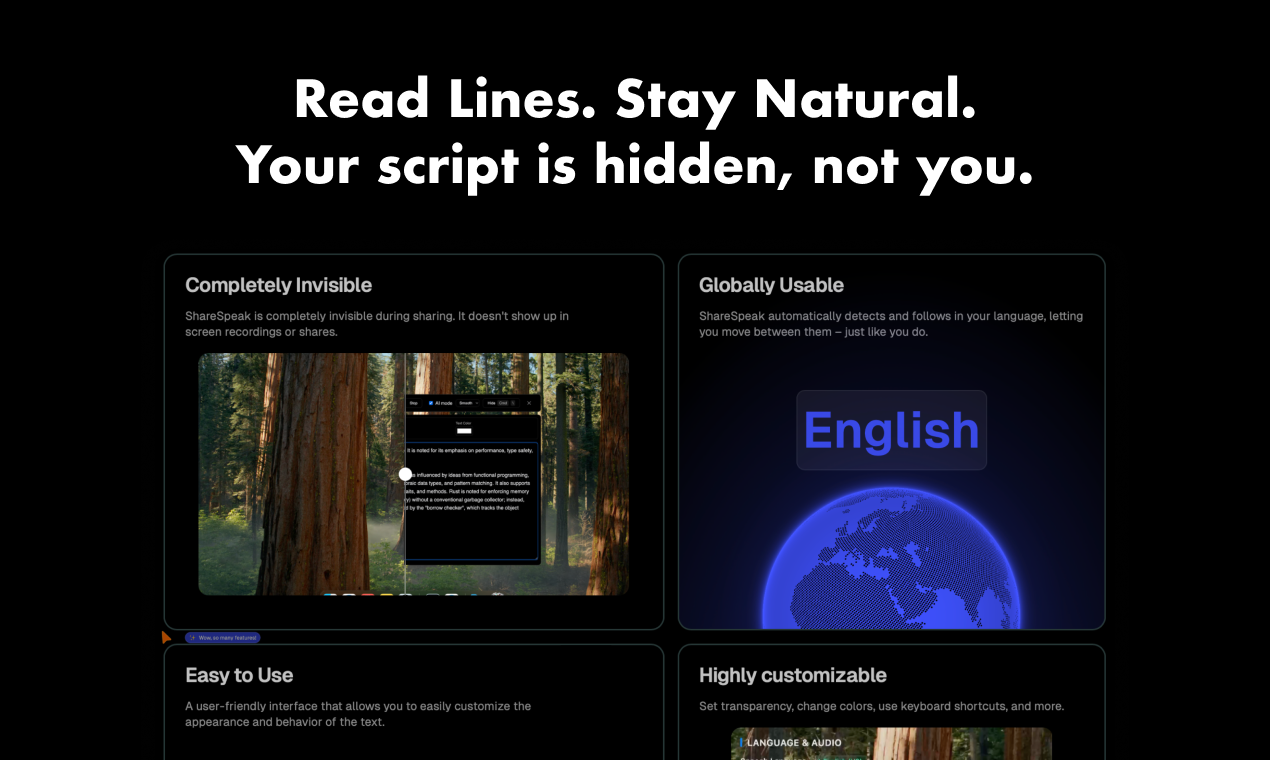
ShareSpeak is a teleprompter for Mac and Windows that its site says stays hidden during screen sharing, calls and recordings. Scrolling follows your voice or can be manual, and you can pause, rewind or double-click a word to jump to it. It also supports a clicker or foot pedal.
Version 0.4.2 adds mirror mode, foot pedal support and Word import. The site lists font, spacing and highlight options and a scripts library. A pricing page exists, but amounts are not included in the listing.
Pixelrope
Best for creators comparing many image and video models

Pixelrope runs 18 image and video models from several providers behind one credit balance. Its site lists modes for creating images, creating video, recasting and AI influencers.
Credits are tied to list prices: 1 credit equals $0.01 of a model's list price. Images start at 1 credit and videos at 9, failed jobs are refunded, and new accounts get 15 free credits with no card. Costs vary by model, so check the pricing page before a larger project.
How to choose
- Running your own server: start with RunOnVPS to see what your apps need.
- Finance or bookkeeping: try StatementConv with its 2 free pages, after checking the supported layouts.
- Developers: look at bf16.ai if fewer refusals matter to you and you have read its terms.
- Content creators: Pixelrope for several models under one balance, ShareSpeak for scripted recordings, and Multiple Images To 3d Model if you need a GLB from photos.
- Looking for ideas: Promptcat, Howtouseappleai and How To Use Muse show real examples, with sources.
- Casual experimenting: Zombietrend, Bulin47ai, Amihotor and Waifu are consumer-style tools.
Treat Linkjob and FaceSearch with extra care. Think about interview rules and consent before using either.
How we put this together
Every tool here is listed on approved.tools and was checked by hand before it went live. What we say about each one comes from its own website; we have not run our own tests, so where a site makes a claim, we say it is the site's claim. Rankings follow how often readers click through to each tool, and placement cannot be bought.
Frequently asked questions
Which new tools can I try without paying?
StatementConv offers 2 free pages with no login, Pixelrope gives 15 free credits with no card, and bf16.ai gives $0.20 in free credit with no card. Amihotor and FaceSearch describe themselves as free.
Which tools list a price on their sites?
StatementConv lists a yearly plan from $15 a month ($180 a year for 4,800 pages), Bulin47ai lists $4.99 for a first video, and Pixelrope explains its credit pricing. For the rest, pricing is not published in their listings.
Which launches are most useful for developers?
RunOnVPS helps size servers for self-hosted apps, and bf16.ai is an LLM API with 1M context and OpenAI-style and Anthropic-style endpoints. Both sites are specific about what they offer.
Do any of these tools need personal photos?
Yes: Zombietrend, Bulin47ai, Amihotor, FaceSearch and Multiple Images To 3d Model all start with uploads. Read each site's privacy details first, and get consent when other people appear.