
CopyThatHQ

Dispatch software where your techs never install an app.

ShareXLinkedIn
Screenshot of CopyThatHQ's homepage

Our take

Is CopyThatHQ worth using?

Approved Tools editorial team · from CopyThatHQ's public website · Nov 26, 2026

CopyThatHQ is aimed at small service shops that have outgrown a group text or whiteboard but do not want software built for large fleets. On CopyThatHQ's dispatch software site, the pitch is narrow: one board, four texts, and no app for technicians. That focus is the main thing that stands out.

The workflow is easy to picture. The office adds jobs, assigns them by dragging, and techs answer with short replies. The site says notes texted back are saved to the customer's history. Tech texting works on any phone that can text, according to the site, which may help shops with mixed devices.

Before choosing it, check the limits. The site says it does not do invoicing, estimates, marketing or GPS tracking, so you would keep your existing tools for those. Customer ETA texts sit on higher tiers and need carrier registration that can take up to 2 weeks. Free covers 2 techs and 40 new jobs a month.

Verdict: Shops with 2 to 10 trucks that want simple dispatch without a technician app should take a closer look.

CopyThatHQ is dispatch and scheduling software for field-service shops running 2 to 10 trucks. Office staff manage a job board, and technicians work entirely by text message. They do not install an app or log in.

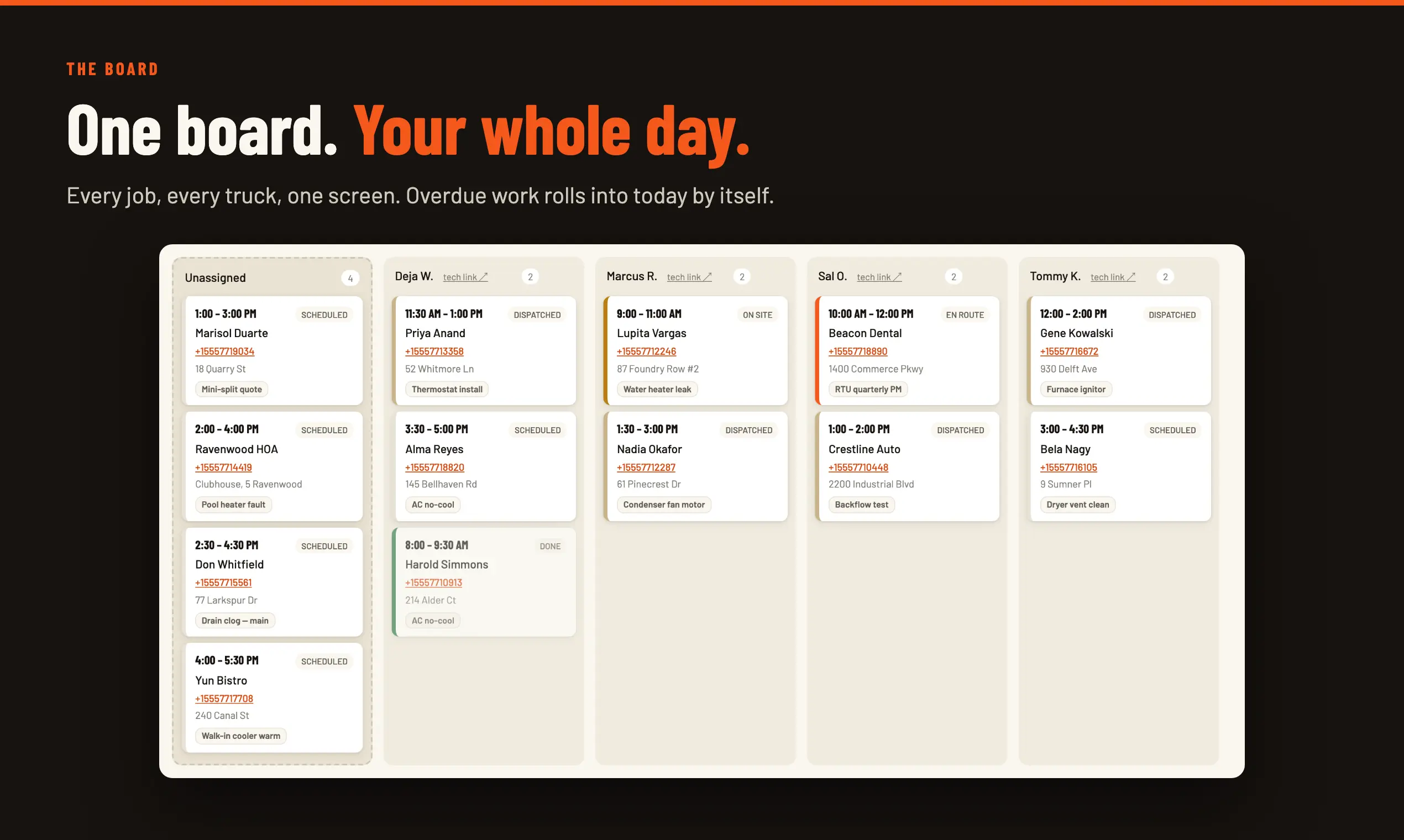
You put jobs on the board by typing them in or importing a spreadsheet. Each job is a card with a time window, customer, address and notes. When you drag a card to a tech's column, that tech gets a text with the job details.

Techs reply OTW, HERE or DONE, and the board updates. Any other reply is saved as a note on the job. The site says the product deliberately skips invoicing, marketing and GPS fleet tracking, so a shop can set it up in an afternoon.


Features

What CopyThatHQ does

1

Drag-and-drop job board

Each job is a card with a time window, customer, address and notes. You can type jobs in or import them from a spreadsheet, and run the board from the desk or the truck.

2

Text-based tech workflow

Techs get each job by text from one shop dispatch number. They reply OTW, HERE or DONE, and the board updates. HELP and STOP also work.

3

Job notes from replies

Any other text a tech sends is saved as a note on the job. Notes stay in that customer's history.

4

Customer history and import

Paid plans include searchable customer and job history. Customers can be imported from a spreadsheet, including exports from Jobber or Housecall Pro, and exported as CSV.

5

Customer ETA texts

On Growth and Fleet, texts go out under your shop's name, and customers get automatic ETA messages. The site says carrier registration is filed for you and can take up to 2 weeks.

6

Flat tier pricing

Plans are priced by tech count, not per user. The site says there are no SMS overage fees, setup fees or contracts.

How to use

Get started in 5 steps

  1. Create an account with an email and password, then confirm the email.
  2. Name your shop and add your techs with their names and cell numbers.
  3. Add jobs by typing them in or importing a spreadsheet.
  4. Drag each job card to a tech's column so they get a text.
  5. Watch the board update as techs reply OTW, HERE and DONE.

Use cases

Who it's for

  • Replacing a group text

    A small HVAC shop can move job details out of a crowded group thread and onto a board. Each tech gets one thread with the office.

  • Dispatching without apps

    A plumbing shop with techs on mixed phones can send jobs by text. Techs reply with short codes and need no login.

  • Moving off a spreadsheet

    A shop that schedules in a spreadsheet can import it and turn rows into job cards. Changes reach techs when you drag a job to them.

  • Switching from a larger platform

    A shop leaving Jobber or Housecall Pro can upload its exported customer list. The site says jobs, quotes and invoices do not come across.

FAQ

Questions people ask

What is CopyThatHQ?

It is SMS-first dispatch software for field-service shops. You manage jobs on a board, and techs get and answer jobs by text with no app.

Is CopyThatHQ free?

There is a free plan for up to 2 techs and 40 new jobs a month, with no card. Paid plans with automatic texting start at $49 a month, and the site lists Growth at $99 and Fleet at $149.

Who is CopyThatHQ for?

The site targets small service businesses with 2 to 10 trucks, such as plumbing and HVAC shops. It says shops above 10 trucks have outgrown it.

What are the best alternatives to CopyThatHQ?

The directory lists no close dispatch alternatives. Its other Productivity listings include ClientSync Solutions, described as business management automation, and ClockZone, a free set of time tools, but neither is a direct match.

Does it handle invoicing?

No. The site says it does dispatch and scheduling only, and not invoicing, marketing or GPS fleet tracking.

Can I export my data?

Yes. The site says customers and jobs, including notes, export as plain CSV files with no row caps.

Written from copythathq.com's public site · updated Nov 26, 2026

Similar tools

Tools like CopyThatHQ

All CopyThatHQ alternatives →